

When someone visits a website, their browser must retrieve the files and information needed to display the page. Those files need a place to live, a system to process requests, and a reliable connection to the internet. This is where web hosting comes in.
A good web hosting guide should explain more than the different hosting plans available. It should help beginners understand how hosting works, what they are paying for, and how to choose a service that suits their website.
Whether you are starting a personal blog, building a business website, or launching an online store, understanding the basics will help you make better decisions. The right hosting environment should meet your current needs while leaving room for future growth.
What Is Web Hosting?
Web hosting is a service that makes a website’s files and functionality accessible over the internet. A hosting provider supplies storage, computing resources, network connectivity, and the software environment needed to deliver website content.
Think of a website as a shop. Its pages, images, and other files are the products on display, while the server is the place where those items are stored and delivered to visitors.
A web server is a computer running software that receives requests and sends website content back to visitors. Depending on the website, the hosting environment may also include databases, application software, email services, security tools, and management features.
Most websites rely on several components:
- Website files: HTML, CSS, JavaScript, images, fonts, and other assets.
- Database: Stores information such as blog posts, user accounts, product details, and settings when the website uses a database.
- Computing resources: CPU and RAM help process requests and run applications.
- Storage: Holds website files, databases, and other data.
- Network connectivity: Allows visitors to communicate with the server.
For example, a WordPress blog needs somewhere to store its WordPress files, uploaded images, themes, plugins, and database. A hosting service provides the environment in which these components operate.
Hosting does not automatically include every service a website needs. Domain registration, professional email, premium backups, and advanced security features may be sold separately.
How Does Web Hosting Work?
Understanding how web hosting works makes it easier to identify common website problems.
Imagine a reader entering your website’s address into a browser. Several steps take place before the page appears.
1. The visitor enters a domain name
A domain name, such as example.com, gives visitors a memorable way to access a website. They do not need to remember the server’s numerical IP address.
2. DNS directs the request
The Domain Name System (DNS) helps translate a domain name into the information needed to locate the relevant server. DNS records tell browsers and other internet services where to direct their requests.
Incorrect DNS settings can prevent a website from opening even when its hosting account is working correctly.
3. The browser contacts the server
The browser sends an HTTP request to the website. HTTP, or Hypertext Transfer Protocol, defines how browsers and servers exchange requests and responses. HTTPS adds encryption through Transport Layer Security (TLS), helping protect information while it travels between the browser and server.
4. The server processes the request
For a simple static page, the server may retrieve a file and send it directly. For a dynamic website, such as WordPress, the server may execute application code, query a database, and assemble the requested page.
The process can require more computing resources when a website has complex features or many simultaneous visitors.
5. The browser displays the page
The browser receives the response and processes the HTML, stylesheets, scripts, images, and other resources. It then renders the page for the visitor.
This is a simplified explanation. Real websites may also use caching systems, content delivery networks, security services, and multiple servers.
For more technical detail, consult MDN Web Docs’ explanation of how the web works.
What Are the Main Types of Web Hosting?
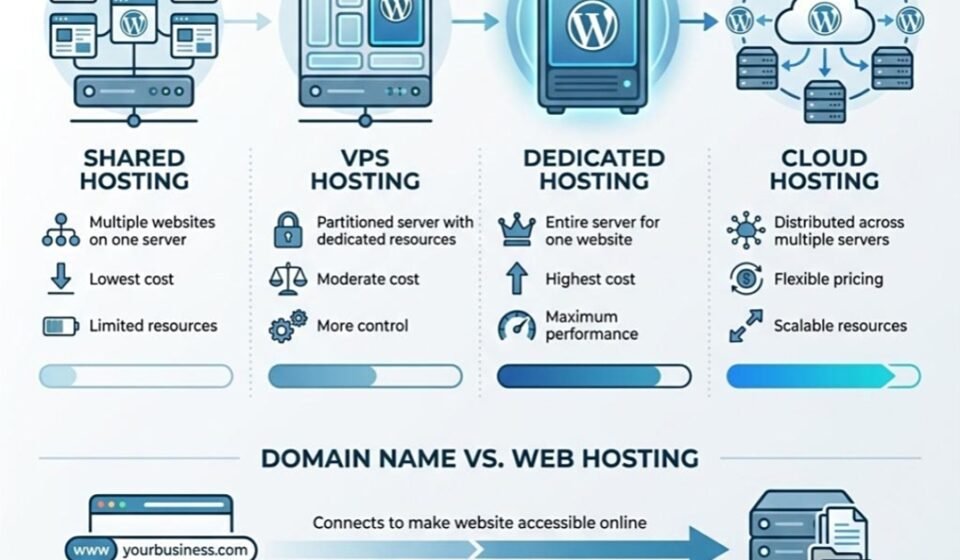
Different hosting arrangements provide different levels of control, resource allocation, maintenance, and flexibility. The labels are useful starting points, but actual features depend on the provider and plan.
Shared Hosting
Shared hosting places multiple websites on the same physical server and operating environment. The websites share underlying resources, although providers may apply account limits and isolation controls.
Its main attraction is simplicity. Providers generally handle much of the server administration, and beginners can often manage their websites through a control panel.
Advantages:
- Usually affordable compared with more resource-intensive options.
- Relatively easy to manage.
- Suitable for many personal blogs and small informational websites.
- Often includes website installation tools and basic support.
Limitations:
- Resource limits may restrict performance during busy periods.
- Server-level customization is limited.
- Other workloads on the same infrastructure may affect performance, depending on resource allocation and isolation.
- Advanced applications may outgrow the available environment.
Shared hosting can be a practical starting point for a new blog that receives modest traffic and does not require unusual server configuration.
VPS Hosting
A virtual private server (VPS) is a virtual machine running on a physical server. Virtualization software divides the underlying hardware into separate environments, each with its own operating system and allocated resources.
A VPS typically provides more administrative control than shared hosting. Depending on the service, users may configure software, adjust server settings, and install applications that are unavailable on entry-level plans.
Advantages:
- More control over the server environment.
- Defined resource allocations in many plans.
- Greater flexibility for custom applications.
- Opportunities to scale resources without necessarily moving to another physical server.
Limitations:
- Usually costs more than entry-level shared hosting.
- An unmanaged VPS requires server administration skills.
- Incorrect configuration can create security or performance problems.
- Allocated resources do not guarantee good performance if the application is poorly configured.
A VPS may suit a growing business website, a busy WordPress installation, or an application that needs custom software.
Dedicated Server Hosting
Dedicated server hosting gives a customer access to an entire physical server rather than a virtual machine sharing that server’s computing resources with other customers.
This arrangement can provide substantial control over hardware resources, operating systems, software configuration, and network settings. The exact level of access depends on whether the service is managed or unmanaged.
Advantages:
- Dedicated physical hardware for the customer’s workloads.
- Greater configuration flexibility.
- Potentially suitable for demanding applications and sustained workloads.
- More direct control over server resource planning.
Limitations:
- Generally more expensive than basic shared hosting.
- Requires careful capacity planning.
- Hardware maintenance, monitoring, and server administration may require technical expertise.
- A single server does not automatically provide high availability or disaster recovery.
Dedicated servers may be appropriate for resource-intensive applications, large databases, specialized software, or businesses with specific infrastructure requirements.
Cloud Hosting
Cloud hosting uses virtualized or distributed infrastructure to deliver computing resources over a network of servers. Depending on the architecture, a website may run on virtual machines or use managed services that distribute different parts of its workload.
Some cloud environments allow resources to be increased or decreased as demand changes. Others require manual configuration or advance planning.
Advantages:
- Flexible resource options.
- Potential to scale during traffic increases.
- Access to additional infrastructure services.
- Opportunities to build resilient systems with appropriate redundancy.
Limitations:
- Pricing can be more complex than a fixed hosting subscription.
- Misconfigured resources may generate unexpected bills.
- Reliability depends on the architecture, provider, and recovery arrangements.
- Cloud hosting may require more technical knowledge than a managed beginner service.
Cloud hosting is worth considering for websites with changing workloads, applications with growth requirements, and businesses that need additional infrastructure services.
Managed Hosting
Managed hosting describes the level of administration provided by the hosting company rather than one specific hardware arrangement. Managed services may be offered for WordPress, VPS environments, cloud servers, and other hosting products.
Depending on the agreement, the provider may handle operating system updates, server monitoring, security maintenance, backups, performance optimization, and technical support.
Unmanaged hosting generally leaves more of these responsibilities to the customer.
Managed hosting can save time for website owners who prefer to focus on publishing or running a business instead of maintaining servers. However, check which tasks are included. A provider may manage the server without managing every plugin, application, or security issue on the website.
Web Hosting Types Compared
| Hosting type | Typical use | Control | Management effort | Scalability | Relative cost |
|---|---|---|---|---|---|
| Shared | Small blogs and basic websites | Low | Low | Depends on plan options | Low |
| VPS | Growing sites and custom applications | Medium to high | Medium to high | Often flexible | Medium |
| Dedicated | Demanding workloads | High | High unless managed | Requires capacity planning | High |
| Cloud | Variable or expanding workloads | Varies | Varies | Potentially high | Varies |
| Managed hosting | Sites needing provider assistance | Varies | Lower for covered tasks | Depends on underlying service | Varies |
These are general patterns, not universal guarantees. A managed cloud service, for example, may be easier to operate than an unmanaged VPS, while dedicated server costs depend on hardware and support arrangements.
How We Compare Web Hosting Options
This guide compares hosting options using practical considerations, including resource allocation, management responsibilities, scalability, security, and overall cost.
Hosting features vary between providers and plans. A VPS does not automatically outperform every shared hosting service, and cloud hosting does not guarantee uninterrupted availability. Readers should review the provider’s current specifications, service terms, backup policies, and renewal prices before making a purchase.
The comparisons explain general differences between hosting models rather than ranking individual providers. Provider-specific claims should be checked against official documentation and contractual terms.
Shared Hosting vs VPS Hosting vs Dedicated Servers
Choosing between shared hosting, VPS hosting, and dedicated servers depends on the workload rather than the size of the business alone.
A personal blog with regular publishing and modest visitor numbers may work well on shared hosting. Moving immediately to a dedicated server could add expense and administration without solving a real problem.
A growing business website may benefit from a VPS if it needs additional resources, greater configuration control, or more predictable resource allocation. The decision should be based on actual usage and the limitations of the current plan.
A resource-intensive application may need dedicated hardware when testing shows that its workload benefits from the available CPU, memory, storage, or hardware configuration.
Before upgrading, review resource usage, error logs, response times, database performance, and caching. A slow website may have an application problem rather than a hosting capacity problem.
For a more detailed comparison, see:
Shared Hosting vs VPS Hosting: Key Differences In 2026
What Is the Difference Between Web Hosting and a Domain Name?
A domain name is the address visitors use to find a website. Web hosting provides the environment that stores and serves the website.
These services work together, but they are not the same thing.
For example, registering example.com does not automatically create a functioning website. You still need website files and an appropriate platform or hosting environment. DNS settings connect the domain to the relevant service.
Likewise, purchasing hosting does not necessarily register a domain. Some providers bundle domain registration with hosting, while others charge separately.
You can register your domain with one company and host your website with another. This separation can provide flexibility, but it requires correctly configured DNS records and awareness of renewal dates for both services.
What Features Should You Look for in a Web Hosting Plan?
A hosting plan should be evaluated by its actual specifications, restrictions, and support arrangements rather than its marketing headline.
Storage Type and Capacity
Check how much storage is included and whether it uses SSD or NVMe storage. Also determine whether databases, email, backups, and staging copies count toward the same limit.
Storage capacity matters for image-heavy publications, product catalogs, and websites that retain large files.
CPU and RAM Allocation
CPU capacity affects how quickly server tasks can execute, while RAM provides working memory for applications and processes. These resources matter more as a website runs complex plugins, database queries, or concurrent requests.
Shared hosting may advertise resource limits rather than dedicated allocations. VPS and cloud plans should be evaluated using their actual resource specifications and restrictions.
Bandwidth and Traffic Policies
Bandwidth refers to the capacity of a network connection, while data transfer describes the amount of data sent and received over a period. Hosting plans may set limits or apply fair-use policies.
A plan advertised as unlimited does not necessarily provide unlimited computing resources or unrestricted use. Read the acceptable-use policy and traffic conditions.
Uptime Commitments
Uptime describes the period during which a service is available. Providers may publish uptime commitments, but a contractual guarantee is not a promise that interruptions will never occur.
Check the measurement method, exclusions, reporting requirements, and remedies for failing to meet the commitment. Service credits, where offered, do not necessarily compensate for lost sales or visitor trust.
Backups and Restoration
Find out how often backups run, how long they are retained, where they are stored, and whether restoration is included in the price.
A backup is useful only if it can be recovered. Maintain an independent copy of important website data and periodically test the restoration process.
SSL and Security Features
Check whether HTTPS certificates are available and renewed automatically. Also look for access controls, malware scanning, firewalls, and protection against distributed denial-of-service attacks (DDoS), where appropriate.
Features vary by plan, and a security feature is not a substitute for maintaining the website itself.
Support Availability
Review support channels, operating hours, response commitments, and the types of problems covered. A provider that can troubleshoot server failures may not offer assistance with custom code or third-party plugins.
Server Location and Latency
The distance between visitors and the server can affect network latency. A server location close to the main audience may reduce some network delays, although caching, routing, application performance, and content delivery network configuration also matter.
Resource Limits, Renewal Pricing, and Migration
Read the renewal price before purchasing. Introductory offers may apply only to the first billing period or require payment for a longer term.
Check inode limits, process limits, database restrictions, email policies, and migration fees. Confirm that the provider supports the software your website requires.
The best hosting plan is one whose specifications match your website’s needs and whose limitations are clearly understood.
How Much Does Web Hosting Cost?
Website hosting costs vary with the type of service, the resources allocated, the provider’s support model, and the length of the subscription.
Shared hosting is generally positioned toward budget-conscious users. VPS plans typically cost more as CPU, RAM, storage, and management services increase. Dedicated servers require payment for physical hardware and associated infrastructure. Cloud services may charge for resources according to usage, configuration, or a combination of fixed and variable fees.
The advertised subscription is not necessarily the total cost of operating a website.
Additional expenses may include:
- Domain registration and renewal.
- Premium themes, plugins, or application licenses.
- Additional storage and backups.
- Managed support or server administration.
- Email services and security products.
- Migration, monitoring, or recovery services.
- Taxes and currency conversion charges.
For an accurate comparison, calculate the total cost over the period you intend to use the service. Compare the introductory price with the renewal rate and check the provider’s current terms before paying. Do not assume that a low initial price will continue throughout the subscription.
How to Choose the Right Web Hosting for Your Website
Use the following steps to narrow down your options.
1. Define the Website’s Purpose
A personal blog, company website, online store, and custom web application have different technical needs. Start by identifying the functions the site must support.
2. Estimate Traffic and Workload
Consider current traffic, likely growth, peak visitor periods, and how much processing each visit requires. A website with complex database operations may need more resources than a lightweight site with the same number of visitors.
3. Set a Realistic Budget
Include renewal costs, backups, licenses, and any management work you cannot perform yourself. Choose a service you can maintain without compromising essential security or recovery arrangements.
4. Assess Your Technical Experience
If you do not know how to administer a server, a managed service or beginner-friendly hosting plan may be more suitable. An unmanaged VPS can offer flexibility, but you remain responsible for many configuration and maintenance tasks.
5. Identify Security and Recovery Requirements
A personal blog has different risk and compliance needs from a store handling customer information. Consider access control, backup frequency, restoration time, and the consequences of downtime.
6. Plan for Growth
Check whether you can increase resources, change plans, or migrate without unnecessary disruption. Avoid paying for infrastructure you cannot currently justify, but understand what an upgrade will involve.
7. Compare Providers Using the Same Criteria
Evaluate resource allocations, restrictions, renewal terms, support, security, and migration policies. Read the terms rather than relying solely on advertising claims.
For a more detailed decision process, see:
[INTERNAL LINK: How to Choose the Right Web Hosting Plan for Your Website]
If you are building with WordPress, also consider how the hosting environment supports PHP, databases, backups, updates, and WordPress-specific troubleshooting.
[INTERNAL LINK: How to Choose Hosting for a WordPress Website]
A Practical Example: Choosing Hosting for a New Blog
Imagine someone starting a WordPress blog with a limited budget and a small collection of articles. They may not need a dedicated server or a complex cloud infrastructure. A suitable shared hosting plan could provide enough resources to get started while keeping administration relatively simple.
As the blog grows, its owner might notice slower response times, resource-limit warnings, or increasing database workloads. Before upgrading, they should check image sizes, caching, plugin behavior, database performance, and server logs.
If the evidence shows that the existing plan’s resources are insufficient, a VPS or another hosting arrangement may be worth considering. The decision should follow measured needs rather than traffic growth alone.
This approach helps website owners avoid paying for unnecessary infrastructure while keeping a clear path toward future upgrades.
Web Hosting Security: What Beginners Should Know
Hosting security is a shared responsibility. The provider protects and maintains the infrastructure covered by its service, while website owners must secure their accounts, applications, and data.
Use HTTPS
Configure a valid TLS certificate so connections between visitors and the website are encrypted. Ensure HTTP requests redirect correctly to HTTPS and resolve any mixed-content warnings.
Keep Software Updated
Install supported updates for your content management system, themes, plugins, and server software where you are responsible for maintaining them. Remove abandoned components that are no longer needed.
Protect Account Access
Use unique, strong passwords and multifactor authentication wherever available. Give each user only the permissions required for their role.
Maintain Reliable Backups
Keep copies of website files and databases, preferably in a separate location from the primary hosting environment. Test restoration rather than assuming that a successful backup job guarantees recovery.
Use Appropriate Security Controls
Firewalls, malware scanning, rate limiting, and DDoS protection can help address different threats. No single tool prevents every attack.
Review Access and Monitor Changes
Remove unused accounts, protect administrative pages appropriately, and investigate unexpected changes, error messages, or unusual traffic.
Website owners who want a more detailed security plan can read:
[INTERNAL LINK: How to Protect a Website From Common Cyberattacks]
For WordPress sites, a separate backup and restoration procedure is also useful:
[INTERNAL LINK: How to Back Up a WordPress Website and Restore It]
For practical account-security guidance, consult CISA’s Secure Our World resources.
How to Improve Website Speed and Reliability
A website’s performance depends on more than its hosting package. Application code, database queries, image sizes, caching, network latency, and third-party scripts can all affect the visitor experience.
Start by identifying the source of the problem before upgrading.
Enable Caching
Page caching stores a prepared version of a page so the server does not need to rebuild it for every request. Object caching can help certain database-intensive applications. The appropriate approach depends on the website.
Optimize Images
Resize images to suit their display dimensions, choose efficient formats, and compress files without unacceptable quality loss. Avoid loading unnecessarily large images on mobile devices.
Use a Content Delivery Network
A content delivery network (CDN) can cache eligible content at locations closer to visitors. This can reduce delivery delays and the load placed on the origin server, although dynamic requests and uncached resources may still need to reach the origin.
Review Application Performance
Remove unnecessary plugins, investigate slow database queries, and reduce avoidable scripts. Measure before and after changes to understand whether they help.
Monitor Uptime and Errors
External monitoring can alert you when a website stops responding. Review server logs and application errors to distinguish infrastructure issues from configuration problems.
Upgrade When Evidence Supports It
If resource limits are consistently reached or application demand exceeds available capacity, a more suitable plan may improve performance. However, more expensive hosting will not automatically fix inefficient code or oversized pages.
Use these related guides as your performance work develops:
[INTERNAL LINK: How to Improve Website Loading Speed]
[INTERNAL LINK: What Is Website Uptime and How Is It Measured?]
Common Web Hosting Mistakes to Avoid
Beginners can avoid many hosting problems by checking a few details before committing to a plan.
Choosing Only by Introductory Price
A discounted first term can make a plan look cheaper than it will be over time. Compare renewal rates and additional charges.
Buying Too Many Resources Too Early
A new informational website rarely needs the same infrastructure as a demanding application. Start with a suitable plan and review actual usage.
Ignoring Backups
Never assume the hosting provider’s backup service is sufficient for every recovery scenario. Keep independent copies and test them.
Neglecting Software Updates
Outdated applications, themes, and plugins can expose websites to known vulnerabilities.
Overlooking Migration Requirements
Check whether files, databases, DNS records, email accounts, and SSL settings can be moved correctly before changing providers.
Assuming Uptime Guarantees Mean Zero Downtime
Review the contractual terms and create a recovery plan for interruptions.
Upgrading Without Diagnosing the Problem
Slow queries, oversized images, excessive scripts, and configuration errors can remain after a hosting upgrade.
If a website develops recurring problems, investigate the cause systematically rather than making several changes at once.
[INTERNAL LINK: Common Web Hosting Problems and How to Fix Them]
Frequently Asked Questions
1. What is web hosting in simple words?
Web hosting is a service that stores a website’s files and makes them accessible over the internet. When someone visits the website, the hosting environment helps deliver its content to their browser.
2. Can I create a website without buying hosting?
Yes. You can build a website locally on your own computer or use a platform that includes hosting. However, a website intended to be publicly accessible needs an appropriate hosting or publishing environment.
3. Which type of web hosting is best for beginners?
Shared hosting or a suitable managed hosting service is often a practical starting point for a small blog or basic business website. The best choice depends on the platform, support requirements, budget, and expected workload.
4. How much hosting does a small website need?
There is no single storage or resource requirement for every small website. A simple text-based site may need relatively little storage, while an image-heavy blog or online store may require more. Estimate storage, traffic, and application requirements, then monitor usage.
5. Is VPS hosting better than shared hosting?
A VPS usually provides greater control and more clearly allocated resources, but it can cost more and require additional administration. Shared hosting may be a better fit for a small website that does not need those capabilities.
6. When should a website move to a dedicated server?
Consider a dedicated server when measured workloads, resource requirements, software constraints, or control requirements justify dedicated physical hardware. Compare it with optimized VPS and cloud alternatives before making the decision.
7. Does web hosting affect website speed and SEO?
Yes, hosting can affect response times, availability, and the technical experience visitors receive. These factors can influence usability and how reliably search engines access pages. However, hosting alone does not guarantee rankings; content relevance and many other factors matter. Read Google’s page experience documentation for more information.
8. Can I change my hosting provider later?
Yes. A website can usually be migrated to another provider, provided the destination supports its technical requirements. Plan the transfer of files, databases, DNS, certificates, and email, and verify the new site before completing the change.
9. Is free web hosting suitable for a business?
Free hosting may be useful for experiments or small personal projects, but it can have restrictions on resources, support, branding, and customization. For a business, assess reliability, security, backups, ownership, and the consequences of service limitations before choosing it.
10. How do I know when to upgrade my hosting plan?
Look for recurring resource-limit warnings, sustained CPU or memory pressure, slow server response under normal workloads, or application requirements the current plan cannot meet. Confirm that the problem originates in hosting before upgrading.
Choose Hosting Based on Your Website’s Actual Needs
The right hosting service provides the resources, reliability, security, and management options a website needs without introducing unnecessary cost or complexity.
For many beginners, a straightforward shared or managed hosting plan is enough to establish a website and learn how it operates. As traffic, application complexity, or business requirements change, a VPS, cloud environment, or dedicated server may become more appropriate.
Start by understanding your website’s purpose, evaluating your budget, and comparing real plan specifications. Keep backups, maintain secure access, monitor performance, and review your requirements as the website develops.
Web hosting is not a one-time technical decision that must remain unchanged forever. With a clear understanding of the available options, you can choose a sensible starting point and make upgrades when evidence shows they are necessary.
Technical References
The following sources provide further information about the technical concepts and security practices discussed in this guide.
- MDN Web Docs — How the Web Works: An explanation of clients, servers, DNS, HTTP, and website delivery.
- Google Search Central — Creating Helpful, Reliable, People-First Content: Google’s guidance on content usefulness, trust, authorship, and transparency.
- Google Search Central — Page Experience: Guidance on website experience and related search considerations.
- CISA — Secure Our World: Practical cybersecurity guidance for protecting accounts and devices.


-
-
-
-
-
Show Comments[…] can explore the fundamentals in our internal guide: The Complete Guide to Web Hosting for Beginners. If you use a different final URL for that article, update this link before […]
[…] you are completely new to hosting, start with our guide: The Complete Guide to Web Hosting for Beginner. Then return here when you are ready to compare hosting […]
[…] readers who want to understand the underlying hosting concepts first, our complete guide to web hosting explains how hosting works and how different hosting environments support […]
[…] between hosting environments can also help organizations avoid unnecessary spending. Our complete guide to web hosting explains the main hosting types and the factors that influence hosting […]
[…] Complete Guide to Web Hosting for Beginners explains the fundamentals of hosting and the differences between common hosting […]