
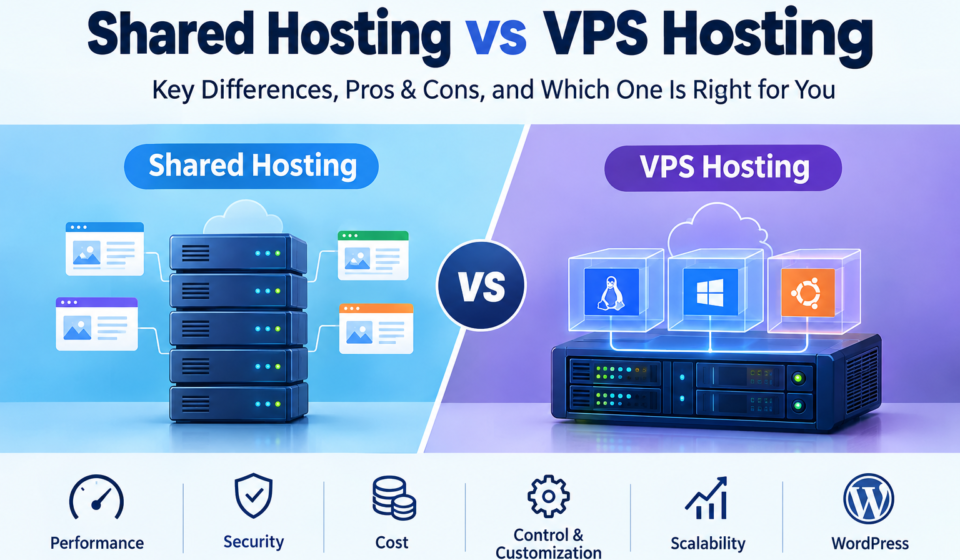

Choosing between shared hosting and VPS hosting can be confusing when you are launching your first website. Hosting companies often advertise low prices, generous storage, and powerful servers, but those offers do not always explain how the hosting environment works or which resources your website actually needs.
The difference matters because your hosting plan affects how your website uses server resources, how much control you have over its environment, and how much maintenance you must handle yourself.
For a new WordPress blog, shared hosting may be enough to publish articles and build an audience. A growing business website, online application, or resource-intensive project may benefit from a virtual private server (VPS) when it needs more control or a different resource allocation model.
This guide compares shared hosting vs VPS hosting in practical terms. You will learn how each option works, how virtualization affects resource allocation, what to check before paying for a plan, and when upgrading is worth considering.
What Is Shared Hosting?
Shared hosting is a web hosting service in which multiple customer accounts use the same physical server. The hosting provider maintains the underlying infrastructure and gives each customer an account for managing their website.
Imagine an apartment building. Several households occupy the same building, but each has its own living space. In a similar way, websites on a shared hosting server have separate accounts, even though they use the same physical machine.
The comparison is not exact: hosting providers use account permissions, resource limits, and other technical controls to separate websites. Nevertheless, it illustrates the basic idea behind shared hosting.
A typical shared hosting plan may include a control panel, website file management, database tools, email accounts, SSL/TLS support, and a one-click WordPress installer. Features differ by provider, so check the plan details rather than assuming everything is included.
How shared hosting works
When a visitor opens your website, their browser sends a request to the server associated with your domain name. The web server processes that request and returns the page’s content, which may include HTML, images, stylesheets, scripts, and other files.
On shared hosting, the same physical server handles requests for multiple websites. Those websites may share CPU capacity, memory, storage performance, and other infrastructure resources.
Providers generally apply limits to keep individual accounts from consuming an unreasonable share of the available capacity. If your website regularly reaches those limits, you may need to optimize the site, change plans, or consider another hosting environment.
Advantages of shared hosting
Affordable starting costs: Sharing infrastructure allows providers to offer plans that are often less expensive than VPS hosting.
Easy website management: A graphical control panel can help you manage files, databases, domains, and email without using command-line tools.
Less server administration: The provider generally manages the operating system and core server infrastructure.
Suitable for common websites: Personal blogs, portfolios, informational websites, and many small business websites can operate well on shared hosting.
Straightforward WordPress installation: Many providers offer installation tools that simplify setting up a WordPress website.
Disadvantages of shared hosting
Shared hosting offers less control over the underlying server environment. You usually cannot install arbitrary system software or change every server-level setting.
Your account also operates within the limits of the hosting plan. High resource consumption by your own website, or contention for shared infrastructure, can affect performance depending on how the provider manages its servers.
This does not mean every shared hosting website is slow. A well-managed server and a properly optimized website can deliver a good experience. The important point is to understand the plan’s limits and monitor your actual usage.
What Is VPS Hosting?
VPS stands for Virtual Private Server. VPS hosting uses virtualization technology to create separate virtual server environments on a physical host machine.
Each virtual server receives a defined configuration, which may include virtual CPU capacity, RAM, storage, and network resources. The exact allocation and performance guarantees depend on the provider and the plan.
A VPS behaves more like a server that you administer than a conventional shared hosting account. Depending on the service, you may be able to choose an operating system, install applications, configure a web server, and control other parts of the software environment.
For example, a developer might use a Linux VPS to run a web application, configure a database, and install the software required by the project. A WordPress website owner might choose a managed VPS to gain more resources without personally handling every server maintenance task.
How VPS virtualization works
Virtualization allows a physical server to run multiple virtual machines. A software layer called a hypervisor helps create and manage those virtual environments.
Each virtual machine can run its own supported operating system and applications while using the physical host’s hardware. The virtual machines share the underlying infrastructure, but their environments are separated through virtualization and related controls.
You can read more about this concept in the Red Hat virtualization documentation.
A VPS is not the same as a dedicated server. With a VPS, you control a virtual environment on shared physical hardware. With a dedicated server, the customer leases an entire physical machine, subject to the provider’s service terms.
Advantages of VPS hosting
More configuration control: A VPS often allows you to install software and adjust server settings that are unavailable on shared hosting.
Defined virtual resources: Plans specify resources such as RAM, virtual CPU capacity, and storage, although the actual performance of those resources still depends on the provider’s infrastructure.
Greater environmental isolation: A VPS is separated from other virtual server environments, providing a different level of isolation from a standard shared hosting account.
Flexible application hosting: You can often run custom applications and supported software stacks.
Options for scaling: Many providers let you upgrade a VPS plan as your workload changes, though some upgrades require a restart or migration.
Disadvantages of VPS hosting
VPS hosting typically costs more than entry-level shared hosting. It can also require additional technical knowledge, especially when the server is unmanaged.
Someone operating an unmanaged VPS may need to maintain Linux or another supported operating system, configure the web server, manage software updates, secure access, monitor resources, and troubleshoot failures.
A managed VPS reduces some of this work, but the word “managed” can mean different things across providers. Confirm which maintenance, monitoring, security, backup, and support tasks are included before purchasing.
Shared Hosting vs VPS Hosting: Main Differences
Both hosting types make websites accessible online, but they differ in resource allocation, control, maintenance, and cost.
| Feature | Shared Hosting | VPS Hosting |
|---|---|---|
| Infrastructure | Multiple customer accounts on one physical server | Separate virtual servers on physical host hardware |
| Resources | Subject to shared-plan limits | Defined virtual resources, subject to provider terms |
| Server access | Usually restricted to account-level tools | Often includes administrative access |
| Operating system management | Generally handled by the provider | Depends on whether the VPS is managed |
| Custom software | Limited to supported options | Greater flexibility within provider restrictions |
| Technical skills | Basic website skills are often enough | Depends on the operating environment and management level |
| Pricing | Usually lower for entry-level plans | Usually higher |
| Performance | Depends on plan limits and server conditions | Depends on allocated resources and configuration |
| Isolation | Account separation within a shared environment | Separate virtual server environment |
| Best use case | Blogs and smaller websites | Workloads needing more control or defined resources |
These are general differences, not guarantees for every product. Some managed hosting services provide capabilities that differ from traditional shared hosting or VPS plans.
1. Performance: Is VPS Hosting Faster?
VPS hosting can provide better performance for a website that has outgrown its shared plan. However, VPS hosting is not automatically faster than shared hosting.
Website speed depends on several connected factors: CPU availability, memory, storage performance, database queries, caching, application code, image sizes, and network conditions. A well-optimized website on shared hosting may load faster than a poorly configured website on an underpowered VPS.
Consider a WordPress blog that starts with a small collection of articles. If the website uses a lightweight theme, optimized images, and sensible caching, its resource requirements may remain modest.
Now imagine that the same blog adds more plugins, complex search features, and resource-intensive database queries. If its hosting account begins reaching CPU or memory limits, the owner may need to investigate the cause.
The solution might be better caching, removing an inefficient plugin, optimizing database queries, or upgrading the hosting plan. Moving to a VPS is one possible answer, but it should follow an assessment of the problem.
Before upgrading, check:
- CPU and memory usage, if your provider exposes those metrics.
- Error logs and resource-limit warnings.
- Page performance and caching configuration.
- Plugin and theme overhead.
- Database response times and slow queries, where measurable.
- Whether traffic spikes or background tasks cause the problem.
The objective is to identify the bottleneck rather than assume that a more expensive hosting type will solve every performance issue.
2. Security: Which Hosting Type Is Safer?
Security depends on the provider’s infrastructure, server configuration, account isolation, software maintenance, and the website owner’s own practices.
Shared hosting providers generally manage the core server environment and apply controls to separate customer accounts. Customers have less access to system-level settings, which can reduce the number of server administration tasks they must perform themselves.
A VPS provides a more separate virtual environment and often more control over security configuration. However, that flexibility also creates responsibility. An unmanaged server with outdated software, weak SSH credentials, or an incorrectly configured firewall can become vulnerable.
For either hosting type, use these basic safeguards:
- Enable HTTPS with a valid SSL/TLS certificate.
- Keep WordPress, plugins, themes, and server software updated.
- Use unique passwords and multi-factor authentication where available.
- Restrict administrative access and remove unused accounts.
- Maintain backups stored separately from the main website.
- Test the restoration process instead of assuming backups are usable.
- Review security alerts and investigate unexpected changes.
For a technical reference, the MDN Web Docs guide to Transport Layer Security explains why HTTPS and properly configured TLS help protect communication between browsers and websites.
Neither shared hosting nor VPS hosting eliminates security risks. Choose a provider with clear security practices and select a management model you can maintain properly.
3. Cost: What Are You Actually Paying For?
Shared hosting is often less expensive because the provider distributes the cost of physical infrastructure among many customers. It can be a practical choice for a new website that does not require custom server configuration.
A VPS typically costs more because it provides a separate virtual environment and a defined resource allocation. Managed VPS hosting may add further costs for administration and support.
Do not compare plans using only their advertised introductory prices. A low first-term rate may be followed by a substantially different renewal price.
Review the following before buying:
- Introductory and renewal prices.
- Billing period and cancellation terms.
- RAM, virtual CPU capacity, and storage.
- Backup frequency, retention, and restoration costs.
- Control panel or software licensing charges.
- Managed support and server administration fees.
- Migration assistance and potential downtime.
- Limits on bandwidth, processes, or other resources.
For an unmanaged VPS, you may also need to account for the time or money required to maintain the server. A cheap plan is not necessarily the least expensive option once management and recovery costs are considered.
Choose a service that meets your actual requirements, rather than paying for resources you are unlikely to use.
4. Ease of Use: Do You Need Technical Skills?
Shared hosting is usually the easier option for beginners. A control panel allows you to handle common website tasks, and the provider manages most of the underlying server infrastructure.
A traditional unmanaged VPS offers more freedom but usually requires more responsibility. Depending on the setup, you may need to understand Linux commands, SSH access, user permissions, firewall rules, web server configuration, databases, and software updates.
Managed VPS hosting provides another option. The provider handles specified server tasks, while you retain the benefits of a virtual server environment.
Before buying a managed plan, ask whether it includes:
- Operating system updates.
- Server monitoring and troubleshooting.
- Security configuration.
- Backup management and restoration.
- Web server and database maintenance.
- Assistance with application-specific problems.
A managed plan may not include every item on this list. Read the service description carefully, especially if your website is important to your business.
If you want to publish articles and manage WordPress without maintaining server software, shared hosting or managed hosting may be the more practical starting point.
5. Scalability: What Happens When Your Website Grows?
Scalability is the ability to accommodate changing demands without creating unnecessary disruption.
A small website may operate comfortably on shared hosting for a long time. If its resource usage increases, the next step could be a higher shared plan, managed WordPress hosting, cloud hosting, or a VPS.
VPS hosting often gives you more control over resource allocation and software configuration. Depending on the provider, you may be able to increase RAM, virtual CPU capacity, or storage as the workload grows.
However, not every upgrade is immediate. Some changes require a reboot, a plan migration, or additional configuration. A VPS can also reach its limits if the website’s workload grows beyond the allocated resources.
Plan upgrades around measured requirements. If your website’s memory use is consistently high, more RAM may help. If slow database queries are the main problem, additional RAM alone may not resolve the underlying issue.
For a website that is important to a business, consider the complete hosting environment, including backups, monitoring, redundancy, and recovery procedures—not just the number of virtual CPU cores.
Shared Hosting vs VPS Hosting for WordPress
WordPress can run on either shared hosting or a VPS. The better option depends on the site’s requirements and how much server administration you want to handle.
Shared hosting can be suitable for:
- New WordPress blogs.
- Informational websites.
- Personal portfolios.
- Small business websites.
- Websites with modest and predictable workloads.
A VPS may be appropriate for:
- WordPress sites that regularly reach hosting resource limits.
- Projects requiring custom server configuration.
- Websites with resource-intensive plugins or applications.
- Developers who need more control over the software environment.
- Projects that need specific server-level capabilities.
Before moving a WordPress site to a VPS, review plugin usage, caching, database performance, PHP configuration, and backup arrangements. Poorly optimized WordPress installations can remain slow after a migration.
If you are launching a new blog, you usually do not need to buy a VPS simply because it sounds more powerful. Start with a plan that supports your website’s requirements and review its performance as the site develops.
When Should You Choose Shared Hosting?
Choose shared hosting when affordability and ease of use are more important than server-level control.
It is a sensible starting point if you are launching a personal blog, a small company website, a portfolio, or a standard WordPress publication. It can also suit owners who prefer to focus on content and website management rather than operating system maintenance.
Before purchasing, confirm that the plan supports your preferred software, includes the features you need, and provides clear information about resource limits and backups.
You can explore the fundamentals in our internal guide: The Complete Guide to Web Hosting for Beginners.
When Should You Choose VPS Hosting?
Choose VPS hosting when you have a specific need for more control, a separate virtual server environment, or resources that your existing plan cannot provide reliably.
It may suit developers running custom applications, businesses with more demanding workloads, or website owners who need server-level configuration.
Before purchasing, decide whether you need a managed or unmanaged service. An unmanaged VPS may offer more direct control, but you must be prepared to maintain and secure the server. A managed VPS may reduce that burden, depending on the support included.
Do not upgrade solely because your website has reached a particular age or article count. Look at actual resource usage, errors, software requirements, and operational needs.
Can You Move From Shared Hosting to VPS Hosting?
Yes. Many website owners start with shared hosting and migrate when their needs change.
A migration generally involves copying website files and databases, configuring the new server, testing the site, and updating DNS records. The exact process depends on your content management system, hosting control panel, application stack, and provider.
A careful migration should include the following steps.
1. Review the reason for moving. Identify whether the problem is resource limits, a software requirement, server configuration, or another issue.
2. Create a complete backup. Include website files, databases, and any configuration information needed to restore the site.
3. Select the appropriate VPS. Check the operating system, RAM, virtual CPU capacity, storage, support, and management level.
4. Prepare the server. Install and configure the required web server, application runtime, database, and security controls.
5. Test the website. Check key pages, forms, login features, images, database-driven content, and redirects before switching traffic.
6. Update DNS when ready. Confirm that the domain points to the new environment and verify the website after the change.
7. Retain the previous hosting temporarily. Keep the old service until the migration has been verified and you are satisfied that the site and its data are working correctly.
DNS changes can take time to be reflected across different networks. For websites that receive orders, registrations, or other changing data, plan how to handle updates during the transition to avoid losing information.
If you are unfamiliar with server administration, ask the provider whether migration assistance is available or consider using a qualified administrator.
Common Mistakes When Comparing Shared Hosting and VPS Hosting
Assuming VPS always means better performance
A VPS offers more control and defined virtual resources, but performance depends on the plan, provider, configuration, and application. Diagnose the cause of slow pages before upgrading.
Choosing a plan only by its introductory price
Check renewal pricing, included support, backup costs, and software fees. The total cost matters more than a single advertised discount.
Buying an unmanaged VPS without a maintenance plan
An unmanaged server needs appropriate updates, access controls, backups, and monitoring. If you cannot handle these tasks, choose a suitable managed service or arrange professional support.
Ignoring resource limits
Shared hosting and VPS plans both have limits. Understand how CPU, memory, storage, and other resources are allocated, and monitor usage where possible.
Forgetting backup restoration
A backup is useful only if it can be restored. Check how often backups run, how long they are retained, where they are stored, and whether restoration is included.
Upgrading before optimizing the website
Large images, unnecessary plugins, inefficient database queries, and poor caching can slow down a website on any hosting type. Fix avoidable problems before spending more on infrastructure.
Frequently Asked Questions
Is shared hosting better than VPS hosting?
Shared hosting is often better for beginners who want a low-cost and easy-to-manage service. VPS hosting is more suitable when a project needs additional configuration control, a separate virtual environment, or resources beyond what its current hosting plan can provide.
Is VPS hosting faster than shared hosting?
Not always. A VPS can help when a website needs more predictable resource allocation, but speed also depends on server configuration, application code, caching, storage, and workload. A well-optimized shared hosting website may outperform a poorly configured VPS.
Is shared hosting secure?
Shared hosting can be secure when the provider maintains the server and properly separates customer accounts. Website owners should still use strong passwords, update software, enable HTTPS, and maintain reliable backups.
Do I need VPS hosting for WordPress?
Most new WordPress websites can begin on a suitable shared hosting plan. A VPS becomes worth considering when you need more control, specific server software, or resources that your existing plan cannot reliably provide.
What is the difference between a VPS and a dedicated server?
A VPS is a virtual server that runs on physical hardware shared with other virtual environments. A dedicated server provides an entire physical machine for a customer’s use under the hosting agreement. A dedicated server generally offers a different level of hardware control but may cost more and require additional administration.
What does managed VPS hosting mean?
Managed VPS hosting means the provider takes responsibility for certain server administration tasks. The exact services vary. Check whether updates, monitoring, security configuration, backups, and troubleshooting are included in your plan.
Can shared hosting handle high traffic?
It depends on the provider, plan limits, website efficiency, and traffic pattern. Some shared plans handle substantial workloads, while others impose tighter resource limits. Monitor your site’s actual usage and discuss suitable upgrade options with your provider if necessary.
Can I upgrade from shared hosting to VPS hosting later?
Yes. You can migrate when your website’s needs justify the change. Back up the site, prepare and test the new environment, plan DNS changes, and verify the website after migration. Ask your hosting provider about migration support if you are unsure how to proceed.
How This Comparison Was Prepared
This guide explains the general technical differences between shared hosting and VPS hosting using established virtualization concepts and public technical documentation. It is an educational comparison, not a test of individual hosting providers or a claim that one plan will outperform another in every situation.
Hosting plans differ in their resource allocation, management services, isolation controls, and pricing. Readers should review the terms and technical specifications of the particular plan they intend to purchase.
The technical background is supported by the Red Hat documentation on virtualization and the MDN Web Docs guidance on TLS. For advice on creating reliable, people-first website content, see Google Search Central’s helpful content guidance.
Conclusion
The choice between shared hosting and VPS hosting depends on your website’s workload, budget, technical requirements, and willingness to manage the server.
Shared hosting is a practical starting point for many blogs, portfolios, and small business websites. It keeps management relatively simple and lets you focus on building the site.
VPS hosting offers more control over a separate virtual server environment and can be useful when your project needs additional resources or custom configuration. It may also require more technical work, especially if the service is unmanaged.
Before upgrading, identify the problem you need to solve, compare the full cost of suitable plans, and check the provider’s resource limits and support terms. Choose the hosting environment that fits your actual needs today while leaving a sensible path for future growth.



[…] Shared Hosting vs VPS Hosting: Key Differences In 2026 […]
[…] while growing applications may benefit from the additional control of a VPS. Read our guide to shared hosting vs VPS hosting to understand their differences in resource allocation, management, and […]
[…] comparing these options can read our guide to shared hosting vs VPS hosting. The best choice depends on actual resource usage, budget, technical skills, support needs, and […]